Engineering demo
Work on parallel features
using coding agents
One engineer. A fleet of agents. Every feature in its own isolated world — folder, branch, and ports.
The reality
You're never working on just one thing
Three things in flight, but you can only stand in one checkout at a time — so two of them sit idle, and each hop back costs you ~20 minutes.
The obvious answer
“Can't I just use subagents, or a tab per feature?”
A reasonable instinct. It even works — for about a day.
Where it cracks
Three cracks show up fast
:3000 repo-a
:3000
And it gets worse over time: no lifecycle to archive or recover a feature, no shared memory between them, and a pile of tabs, folders, and branches you track in your head.
The answer
Meet mx
The one tool that makes all three cracks disappear.
What is mx
The whole system in one picture
read by every agent
Repos up top (cloned once, read-only), a context registry in the corner (shared memory every agent reads), and one work per feature — each with its own agent and a worktree + port per repo it touches.
Mission control
One view of the whole fleet
Every feature and its ports, grouped by stage — one place to see the whole fleet: what's in progress, in review, and up for PR. Nothing lost in a forgotten tab.
mx mission-control
See the whole runtime, live
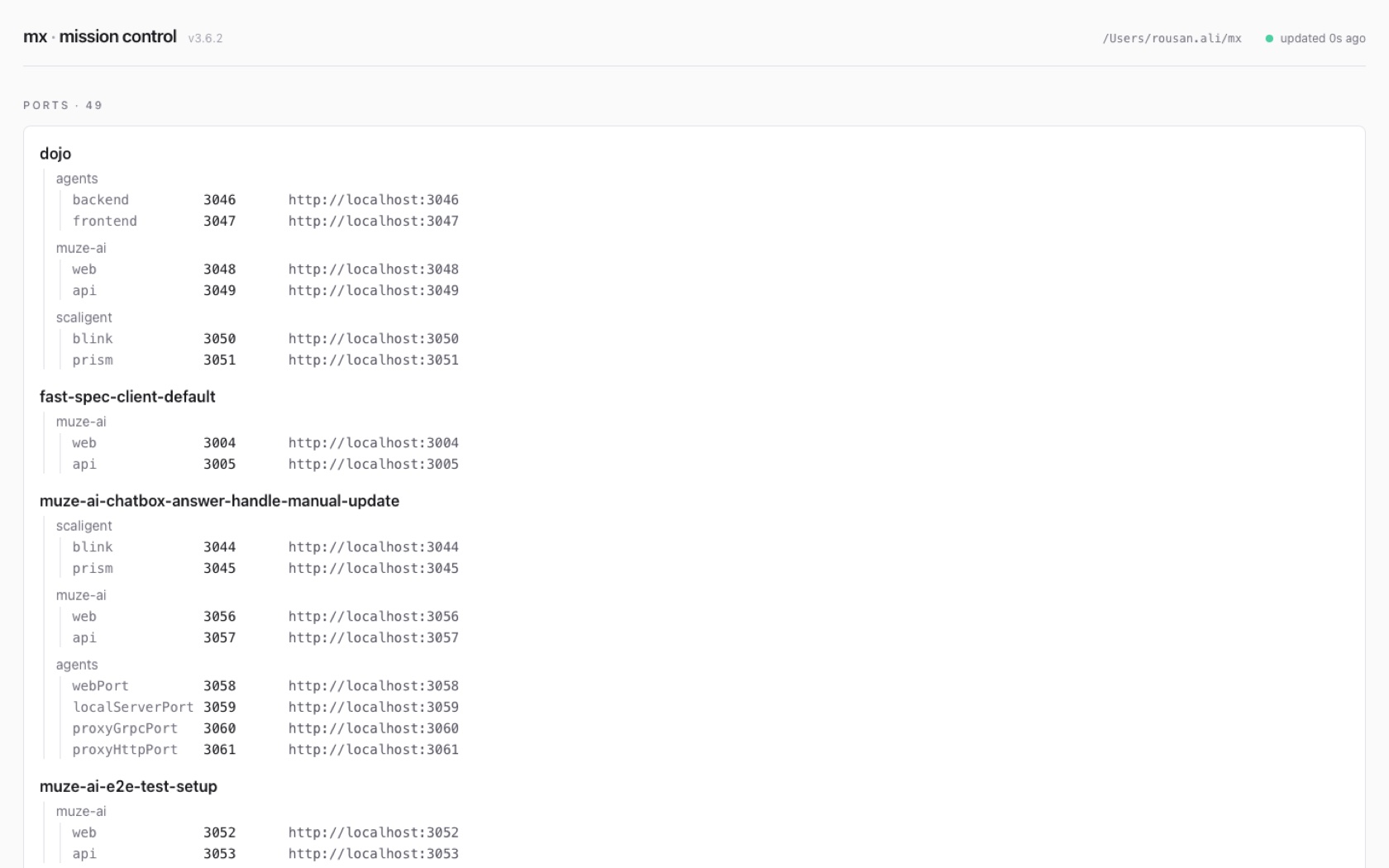
mx mission-control starts a local, read-only web dashboard — every work with its services, allocated ports, and live localhost URLs, plus repo and work health, streamed live.
How I actually run mx
- One fullscreen macOS Space per feature — terminal + editor split side by side.
- Coding agent in the terminal (auto mode); dev server & git in another tab.
- Three-finger swipe between features; Mission Control for the whole board.
- Grouped by stage with
mx divider— in progress, in review, shipped.
Let me switch over and show you my real setup — then we'll break down each piece.
How it's organized
Four words, and you've got it
Runtime holds it all · Repo is a clone · Work is a feature · Worktree (wt/<repo>) is a checkout you code in — a work can have one per repo.
On disk
The whole runtime is one folder
mx owns the structure — work.json, the editor workspace, and ports are written only through mx commands. repos/ stay read-only; everything you build lives in works/<feature>/wt/.
Parallel agents
One agent per checkout → a fleet in parallel
Each agent lives in its own worktree, branch, and ports — so a fleet works at once, and none of them step on each other.
Feature · worktrees
Many working copies, one clone
git worktrees let many branches be checked out at once, in separate folders, sharing one .git object store — full isolation with no duplicated repo on disk. mx creates and tracks them for you (mx work new / worktree add).
Feature · repos
One feature, many repos — one agent covers all
agent
The one-session-one-repo wall, gone. A work groups a worktree per repo under one feature, so a single agent session edits across all of them — the change spanning repo-a + repo-b that a per-repo tab simply can't make together.
Feature · ports
Run the same app many times, side by side
The port clash, gone. mx allocates each feature its own ports, unique across the whole runtime — so the very same app (repo-a) runs three times at once, one per feature, each with its own live URL. mx work port set hands out a free one; the ports board shows who owns what.
Feature · hooks
A fresh worktree, ready to run
The hand-hydration, automated. The moment a worktree exists, mx fires the post-worktree-create hook — you decide what “ready” means (copy env, install, seed, …), in any language. It's one hub of lifecycle hooks: worktree create/remove, work archive/unarchive, repo fetch, health, and session-prompt.
Feature · context
Shared memory across every feature
conventions/code-style
runbooks/deploy
…
The shared memory you didn't have. A runtime-wide registry of findings, decisions, conventions, and runbooks — indexed in INDEX.json. Every feature's agent reads the same institutional memory, so a hard-won discovery in one feature isn't re-learned in the next.
What one feature looks like
One feature, one Space
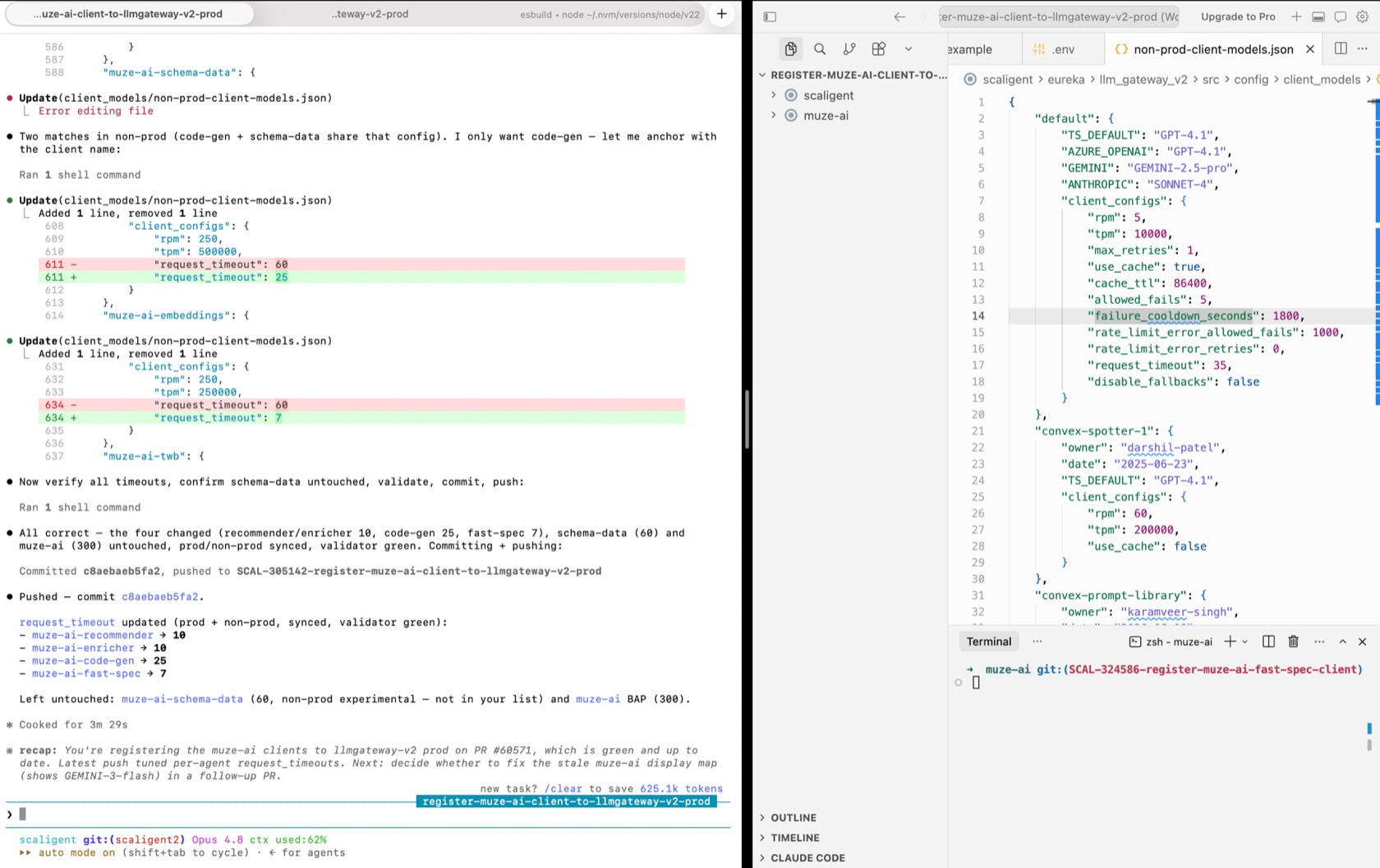
A real feature Space: the coding agent in auto mode (left) working one feature across two repos, the editor beside it. Terminal left, editor right — one fullscreen macOS Space per feature.
Your board
One Space per feature, grouped by stage
The clutter, organized. Every feature is its own macOS Space, grouped by stage with mx divider — so you always know what's in progress, in review, and shipped. Swipe to switch; nothing is ever torn down.
Memory & lifecycle
Pause a feature, pick it up later
sessions/*.md notes as you go.mx work archivemx work unarchiveThe lifecycle you were missing. Every work keeps session summaries (sessions/*.md) — a distilled record of each session, so you or a fresh agent can resume cold. mx work archive frees the ports and worktrees but keeps the branches and notes; mx work unarchive brings it all back.
The payoff
Serial → parallel
More shipped per engineer — parallel instead of serial, and it compounds as agents do more of the typing.
Try it
Two commands in
Then mx repo add your repos and mx work new your first feature. Full guide, mental model, and command reference: mx.rousanali.com
Give every feature its own desk.
Questions? Let's run one live.